Before we dive into coding, its essential to understand Socket which is the most important aspect of network programming.
Socket is an object that represents a low level access point to the Internet Protocol(IP) stack, it is used to send and receive data, thus it can be opened and closed, the data to be sent is always sent in block known as Packet.
Packets must contain the IP address of both the source of the packets and the destination computer where the data is being sent, and optionally it may contain a Port number. A port number is between 1 and 65,535. A port is a communication channel or endpoints on which computers can communicate. It is always recommended that programs use port number higher than 1024 to avoid conflicts with other applications running on the system, because no two applications can use the same port.
Packets containing port numbers can be sent using UDP(User Datagram Protocol) or TCP/IP(Transmission control protocol). UDP is easier to use than TCP because TCP is more complex and has longer latencies, but when the integrity of the data to be transferred is more important than performance, then TCP is prefered to UDP, and thus for our file sharing application TCP/IP will be used because it guarantees that our file does not become corrupt while being transfered and if during the transmission process a packet is loss, it is retransmitted thus making sure that our file integrity is maintained.
Thus, this application will allow you to send any file from one computer to another, personally I have used it to send a 350mb file from one desktop PC to another.
Now to get started, create two new windows forms applications one named FileSharingServer and the other FileSharingClient.
Now, for the FileSharingClient windows form application add three textboxes and two buttons to the form just like the screen below.
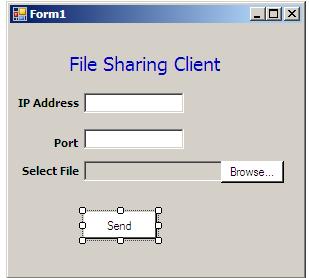
Rename the textboxes and buttons appropriately.
This is the code for the file sharing client application
using System;
using System.Collections.Generic;
using System.ComponentModel;
using System.Data;
using System.Drawing;
using System.Linq;
using System.Text;
using System.Windows.Forms;
using System.Threading.Tasks;
using System.Net;
using System.Net.Sockets;
using System.Net.NetworkInformation;
using System.IO;

namespace FileSharingClient
{
    public partial class Form1 : Form
    {
        private static string shortFileName = "";
        private static string fileName = "";
        public Form1()
        {
            InitializeComponent();
        }

        private void btnBrowse_Click(object sender, EventArgs e)
        {
            OpenFileDialog dlg = new OpenFileDialog();
            dlg.Title = "File Sharing Client";
            dlg.ShowDialog();
            txtFile.Text = dlg.FileName;
            fileName = dlg.FileName;
            shortFileName = dlg.SafeFileName;
        }

        private void btnSend_Click(object sender, EventArgs e)
        {
            string ipAddress = txtIPAddress.Text;
            int port = int.Parse(txtHost.Text);
            string fileName = txtFile.Text;
            Task.Factory.StartNew(() => SendFile(ipAddress,port,

             fileName,shortFileName));
            MessageBox.Show("File Sent");
        }

        public void SendFile(string remoteHostIP, int remoteHostPort

           , string  longFileName, string shortFileName)
        {
         try
         {
          if(!string.IsNullOrEmpty(remoteHostIP))
            {
             byte[] fileNameByte = Encoding.ASCII.GetBytes

             (shortFileName);
             byte[] fileData = File.ReadAllBytes(longFileName);
             byte[] clientData = new byte[4 + fileNameByte.Length

                + fileData.Length];
             byte[] fileNameLen = BitConverter.GetBytes(

              fileNameByte.Length);
             fileNameLen.CopyTo(clientData, 0);
             fileNameByte.CopyTo(clientData, 4);
             fileData.CopyTo(clientData, 4 + fileNameByte.Length);
             TcpClient clientSocket = new TcpClient(remoteHostIP,

              remoteHostPort);
             NetworkStream networkStream = clientSocket.GetStream();
             networkStream.Write(clientData, 0, clientData.GetLength

              (0));
             networkStream.Close();
           }
         }
         catch
         {

         }
        }
    }
}
Note the following namespaces were added to the windows form application
System.Threading.Tasks;
   System.Net;
   System.Net.Sockets;
   System.Net.NetworkInformation;
the three namespaces above contain the .Net classes used for Network programming
System.IO;
When the browse button is clicked an object of OpenFileDialog is created to open a dialog to get the file name of the file to be sent. When the send button is clicked, the SendFile method is called and handled in parallel so that the main form user interface does not get frozen while the file is being sent and the processors are fully utilized in a multi-core environment.
The SendFile method accepts IP address and port number of the destination computer as well as the file path and file name. Both the file name and the file are converted to bytes and sent to the destination computer using the TCPCLient and NetworkStream classes object created.
The user interface of the file sharing client application is shown below when run.
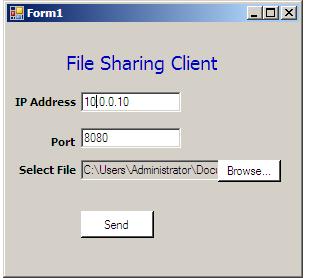
The source code for the server is
using System;
using System.Collections.Generic;
using System.ComponentModel;
using System.Data;
using System.Drawing;
using System.Linq;
using System.Text;
using System.Windows.Forms;
using System.Net;
using System.Net.Sockets;
using System.Net.NetworkInformation;
using System.IO;
using System.Threading.Tasks;

namespace FileSharingServer
{
    public partial class Form1 : Form
    {

        public delegate void FileRecievedEventHandler(object source,

          string fileName);

        public event FileRecievedEventHandler NewFileRecieved;

        public Form1()
        {
            InitializeComponent();
        }

        private void Form1_Load(object sender, EventArgs e)
        {
            this.NewFileRecieved+=new FileRecievedEventHandler
            (Form1_NewFileRecieved);
        }

        private void Form1_NewFileRecieved(object sender, string
         fileName)
        {
            this.BeginInvoke(
            new Action(
            delegate()
            {
                MessageBox.Show("New File Recieved\n"+fileName);
                System.Diagnostics.Process.Start("explorer", @"c:\");
            }));
        }

        private void btnListen_Click(object sender, EventArgs e)
        {
            int port = int.Parse(txtHost.Text);
            Task.Factory.StartNew(() => HandleIncomingFile(port));
            MessageBox.Show("Listening on port"+port);
        }

        public void HandleIncomingFile(int port)
        {
          try
            {
                TcpListener tcpListener = new TcpListener(port);
                tcpListener.Start();
                while (true)
                {
                  Socket handlerSocket = tcpListener.AcceptSocket();
                    if (handlerSocket.Connected)
                    {
                     string fileName = string.Empty;
                     NetworkStream networkStream = new NetworkStream

                      (handlerSocket);
                     int thisRead = 0;
                     int blockSize = 1024;
                     Byte[] dataByte = new Byte[blockSize];
                     lock (this)
                     {
                      string folderPath = @"c:\";
                      handlerSocket.Receive(dataByte);
                      int fileNameLen = BitConverter.ToInt32(dataByte,

                       0);
                      fileName = Encoding.ASCII.GetString(dataByte, 4,

                       fileNameLen);
                      Stream fileStream = File.OpenWrite(folderPath +

                       fileName);
                      fileStream.Write(dataByte, 4+fileNameLen,(

                       1024-(4+fileNameLen)));
                      while (true)
                      {
                       thisRead = networkStream.Read(dataByte, 0,

                        blockSize);
                       fileStream.Write(dataByte, 0,thisRead);
                       if (thisRead == 0)
                        break;
                      }
                      fileStream.Close();

                    }
                    if (NewFileRecieved != null)
                     {
                       NewFileRecieved(this, fileName);
                     }
                    handlerSocket = null;
                    }
                }

            }
            catch
            {

            }
        }
    }
}
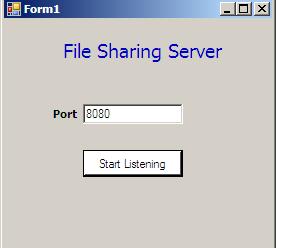
At the file sharing server application, a port number is supplied, on which the server will be listening to an income file to be recieved.
Just like the file sharing client application, the start listening button when clicked, invokes the HandleIncomingFile method in parallel. A TcpListener object is created to start listening for incoming file at the specified port, when a connection is received the a file with the same name as the file sent from the client is reconstructed from the received bytes and saved to the C drive and then an event is fired to indicate on the server user interface that a new file has been received.
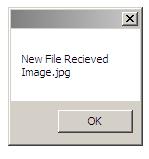
When the event is fired, all subscribers to the event are notified and in this case the event handler method Form1_NewFileRecieved is invoked and the code to display a message box and open the folder containing the file received is wrapped around the form BeginInvoke method to avoid thread errors.
The Complete source code of the two applications is available for download Here
Comments (38)
hi. i have followed the example but it dosent work. i have done the Client and server but no files can be recived...
@Simon I have tested it and so have many other people who have given their testimonies, it works. Try turn firewall off on the server and try it again, if it still doesnot work, try and ping the server from the client to see if the two computers you are using can communicate at all
sir i am final year student my project is based on same file sharing system, need some extension from you sir.... i want to modify my application, by now my application communicates between 1 to 1 i.e server to client n vice-versa but now i want to make it with multiple clients..need some help!!!
@niknil Its multicasting that will solve the problem or better still you can try WCF, but I will recommend you search codeproject and msdn there are a lot of articles that can be of help
When im using this program Im unable to run the program as in the function public void HandleIncomingFile(int port) The server is waiting for accepting Client connection in the place Socket handlerSocket = tcpListener.AcceptSocket(); and because of that im unable to proceed further....
@Aarthi this line of code Socket handlerSocket = tcpListener.AcceptSocket(); waits for an incoming connection, it will not proceed further until a connection has been established, I mean until a client computer connects to the server computer.
hi,first i wanna say thanks for ur hard work. but i have a question i hope u can help me ?! can i use my own computer as client and server at the same time..i tried to put in the ip address field this IP 127.0.0.1 ( that from what i know is used when i want my computer to act as the client & the server at the same time) every thing is working accept for the final step NO message box is displayed opening the folder containing the picture i have sent and where can i exactly find the picture that i have sent
Hi! where can i download this project, like the full project
@Taki sorry my reply is coming late I have been busy lately, you can use your computer as both the client and server, it will still work, as for where the file will be, the sent file will be dropped in the root folder of you C: drive, you can change it in the code to wherever you like.
@Lura you can download the application using this link, http://ayobamiadewole.com/Blog/Files/FileSharingSharing.rar
this very useful information can this project use full this way after send data to the server to automatically resend data to back to the client after severer done some calculation finish 2)do u use any webserver(service )to do such thing?
@Chamara, that is quite possible, communication can be from the client to the server and the other way round. The code doesnot use webservice, it uses .Net TCP/IP classes, but you can equally use WCF to achieve the same purpose.
first i wanted to thank you for this. I've been trying same but constantly getting the exception"access to path is denied". Well your code did it! May i ask you to help me with that exception? Looking forward for your reply
I also wanna ask a thing, what is the reason behind giving same name to delegate and ref var of event? I did not get this point
@Zeshan its good to hear that, as pertaining to your exception, its likely your code is trying to access a path where it currently does not have permission, you can see if elevating the application to an admin will solve it. Its not the same name, "NewFileRecieved" its an object of the delegate, the delegate was not used directly an object of it was created.
Respected Sir i am using .net 3.5 and it does not support Reference System.threading.task. So i cannot use this line "Task.Factory.StartNew(() => HandleIncomingFile(port)); MessageBox.Show("Listening on port"+port);" Is there any other way of writing this code?
@Kiran you can use Threading in 3.5 to achieve this as well, that HandleIncomingFile() method can be placed on a separate thread and things will work file
thank you sir its working fine
Dear sir actually i am new to c# i was develop some mobile computer application but my device support only visual studio 2005 & your application is working on 2008 so can you please provide me a code for file sharing (client/server)which support visual studio 2005
@Jitu, to make the code run using VS 2005, replace Task.Factory.StartNew() line of code with an equivalent threading implementation, it should work with that
thank you sir iwill check & revert you
hello sir I need system.threading.task dll file(framework 3.5) kindly fwd to my mailid,if nt give me code for file transfering from client to server......thanku
hello sir, my project is "data leakage detection" i want to upload a file n send it to other pc (both r connecting lan cable ) but when i upload n click snd buton , the records are inserted into table bt my error is 'file sending fail,a connection attempt fail' plz give a soltn
@Chinna check if both computers are connected, try and ping both pcs IP addresses from each other and see if they can communicate, because the error is most probably a communication error
hi sir, now im connecting 2systmes in lan dat works perfectly ,but my problem z im sending only small size files only like 9kb... but i want to send large files also please give me a sol..
hi sir, in my project my problem is im sending small files but if i send large file n videos sending ,files sending specified location but not opened file is damaged and could n't be repaired plz give sol asap
hi sir ,im creating c#windows app setup file ,install it to other pc ,when i run dt setup the login form cn't login properly , my error is a network related or instance spesific error occured while establishng a connection to sql. the server was not found r not accesible verify that the insatnce name is correct and that sql server is configured to allow remote connection.....plz give sol for me asap early
@Chinna are you using the source code here, if yes, I have tested it and so have others, it does maintain the integrity of the file when sent, and it does not corrupt it, I have used it to send a file of 400MB in size.
@Sridar the problem is in your connection string check whether the correct sql server instance was specified in the connection string
hi , in prjct im using c#.net . i create c#.net win form setup file n install n run other system bt my prblm is it vl open login form but when i enter agentid ,name ,psw it's nt wrk properly,i set all of conctn string ,datasource r correctly afr setng al thease proprties den only i create setup file but my error is a network related or instance spesific error occured while establishng a connection to sql. the server was not found r not accesible verify that the insatnce name is correct and that sql server is configured to allow remote connection.....plz give sol for me asap early
Thnx dude........its working Very helpful
Sir, as one of the computer is behaving like a server so is it necessary to install software for making a pc behaving like a server? and are the devices connected to a particular network over which they are communicating?
Hello Ayobami Adewole! Can I get example next program: I have two computers which should sen data each other. And if other computer example press button1 on own form, it will make some changes to other computers form. I try to do card game where all users changes show also to other users who use the same game on other pc. That can be hard to understand but if you could help? :) :) :)
What you want to achieve is Network Multicast, the application here does unicast.
Hi Ayobami, Thanks for project. I tested and working.
haloo sir these program working extent ,but i want display client ips who r connected to server, in server listbox please mail me that code sir thakks
Hello, I need to learn certain things 4rm u. they include 1. How to develop Client Server Applications 2.Reporting with Crystal report. 3. Printing reports, mailing reports, converting reports to pdf and Excell. plz do send me a mail. Thanks
Your app works perfectly, thank you very much. I even tried it outside my LAN. Thanks